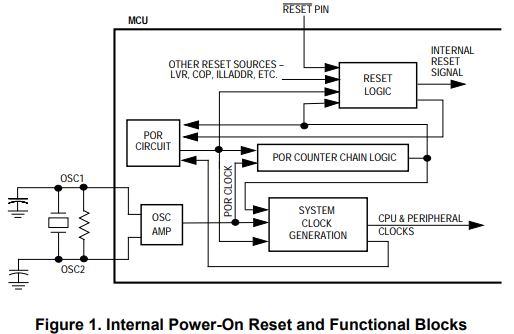
In the world of hardware and system design, the term "System POR alignment" frequently surfaces. POR stands for "Power-On Reset," a crucial process that ensures a system is correctly initialized when the power is turned on. System POR alignment encompasses a series of steps and checks to guarantee that this initialization process is flawless, promoting system stability and reliability. Let’s delve into the specifics of what System POR alignment entails.
1. Hardware Initialization
Definition: Hardware initialization refers to the process of setting up the physical components of a system so they are ready for operation as soon as the power is turned on.
Details:
- Component Detection: The system identifies and verifies all connected hardware components such as CPUs, GPUs, memory modules, and peripheral devices.
- Configuration Settings: Initial configuration settings are loaded. These settings are often stored in non-volatile memory and define how each hardware component should operate.
- Signal Synchronization: Timing signals and clocks are synchronized across different components to ensure cohesive operation.
- Self-Test Procedures: Many systems perform Power-On Self Tests (POST) to check the functionality and status of essential hardware components. This process identifies potential issues before the system fully boots up.
Importance: Proper hardware initialization is critical as it ensures that all physical components are in a known good state, ready to function correctly under the control of the operating system and applications.
2. Firmware and Software Initialization
Definition: This step involves loading and executing the system’s firmware and essential software routines necessary for the basic operation of the hardware.
Details:
- Bootloader Execution: The bootloader is a small program that runs immediately after the system is powered on. Its primary function is to load the operating system or the next stage of the initialization process.
- Firmware Loading: Firmware, which is often stored in ROM or flash memory, contains low-level code that directly controls the hardware. This includes BIOS or UEFI in modern PCs.
- Kernel Loading: The operating system kernel is loaded into memory and initialized. The kernel is responsible for managing system resources and hardware communication.
- Driver Initialization: Device drivers, which allow the operating system to interact with hardware components, are loaded and initialized.
Importance: Correct firmware and software initialization ensures that the system can effectively control and manage hardware components, paving the way for the full operating system to take over.
3. Power Management
Definition: Power management involves controlling and optimizing the power usage of the system to ensure efficient operation and extend the lifespan of the hardware components.
Details:
- Power Rails Activation: Different components in a system often require different voltages. Power management ensures that all necessary power rails are activated and stabilized.
- Thermal Management: Mechanisms to monitor and manage the system's temperature are activated to prevent overheating, which can damage components or reduce performance.
- Energy Efficiency Modes: Systems are configured to enter various energy-saving modes (e.g., sleep, hibernate) based on current usage and power policies.
- Battery Management: In battery-powered devices, power management includes monitoring battery health, charge cycles, and ensuring optimal battery usage.
Importance: Efficient power management is essential for maintaining system performance, preventing overheating, and ensuring the longevity of both portable and stationary systems.
4. System State Verification
Definition: This involves procedures and checks to ensure that the system operates as expected after the power-on sequence is complete.
Details:
- Status Indicators: LEDs or display messages indicate the current state of the system and any errors detected during initialization.
- Diagnostic Tests: Additional tests may be performed to verify the integrity and functionality of critical system components.
- Logging: Events and errors detected during the power-on sequence are logged for future reference and troubleshooting.
- Error Handling: Mechanisms are in place to handle initialization errors gracefully, such as retrying failed operations or alerting the user to take action.
Importance: Verifying the system state post-initialization is crucial for identifying any issues that may have arisen during the power-on process and ensuring the system is ready for normal operation.
Conclusion
System POR alignment is a comprehensive process that ensures a system is correctly initialized when powered on. It involves intricate steps for hardware and software initialization, efficient power management, and thorough system state verification. Each aspect of this process is critical for the overall stability, reliability, and performance of the system. Understanding and implementing robust POR alignment practices is essential for anyone involved in hardware and system design, contributing to the creation of resilient and high-quality computing systems.
하드웨어 및 시스템 설계의 세계에서는 "System POR alignment"라는 용어가 자주 등장합니다. POR은 "Power-On Reset"의 약자로, 시스템의 전원이 켜질 때 올바르게 초기화되도록 하는 중요한 과정입니다. 시스템 POR 정렬은 이 초기화 과정이 완벽하게 이루어지도록 보장하는 일련의 단계와 확인 절차를 포함하며, 시스템의 안정성과 신뢰성을 촉진합니다. 이제 시스템 POR 정렬의 구체적인 내용을 살펴보겠습니다.
1. 하드웨어 초기화
정의: 하드웨어 초기화는 시스템의 물리적 구성 요소가 전원이 켜지자마자 운영 준비 상태가 되도록 설정하는 과정을 의미합니다.
세부 내용:
- 구성 요소 감지: 시스템은 연결된 모든 하드웨어 구성 요소(CPU, GPU, 메모리 모듈, 주변 장치 등)를 식별하고 검증합니다.
- 설정 로드: 초기 구성 설정이 로드됩니다. 이러한 설정은 비휘발성 메모리에 저장되어 있으며 각 하드웨어 구성 요소가 어떻게 작동해야 하는지를 정의합니다.
- 신호 동기화: 시간 신호 및 클럭이 다양한 구성 요소 간에 동기화되어 일관된 작동을 보장합니다.
- 자가 테스트 절차: 많은 시스템은 Power-On Self Tests (POST)를 수행하여 필수 하드웨어 구성 요소의 기능 및 상태를 점검합니다. 이 과정에서 시스템이 완전히 부팅되기 전에 잠재적인 문제를 식별합니다.
중요성: 올바른 하드웨어 초기화는 모든 물리적 구성 요소가 양호한 상태에 있으며, 운영 체제와 애플리케이션의 제어 하에 제대로 작동할 준비가 되어 있음을 보장합니다.
2. 펌웨어 및 소프트웨어 초기화
정의: 이 단계에서는 시스템의 기본적인 하드웨어 작동에 필요한 펌웨어 및 필수 소프트웨어 루틴을 로드하고 실행하는 과정을 포함합니다.
세부 내용:
- 부트로더 실행: 부트로더는 전원이 켜지자마자 실행되는 작은 프로그램으로, 운영 체제 또는 초기화 과정의 다음 단계를 로드하는 역할을 합니다.
- 펌웨어 로딩: ROM이나 플래시 메모리에 저장된 펌웨어는 하드웨어를 직접 제어하는 저수준 코드를 포함합니다. 이는 현대 PC의 BIOS 또는 UEFI를 포함합니다.
- 커널 로딩: 운영 체제 커널이 메모리에 로드되고 초기화됩니다. 커널은 시스템 자원 및 하드웨어 통신을 관리합니다.
- 드라이버 초기화: 운영 체제가 하드웨어 구성 요소와 상호 작용할 수 있도록 하는 디바이스 드라이버가 로드되고 초기화됩니다.
중요성: 올바른 펌웨어 및 소프트웨어 초기화는 시스템이 하드웨어 구성 요소를 효과적으로 제어하고 관리할 수 있도록 하며, 전체 운영 체제가 인계받을 수 있는 기초를 마련합니다.
3. 전력 관리
정의: 전력 관리는 시스템의 전력 사용을 제어하고 최적화하여 효율적인 운영을 보장하고 하드웨어 구성 요소의 수명을 연장하는 과정을 포함합니다.
세부 내용:
- 전력 레일 활성화: 시스템의 다양한 구성 요소는 종종 다른 전압을 필요로 합니다. 전력 관리는 필요한 모든 전력 레일이 활성화되고 안정화되도록 합니다.
- 열 관리: 시스템의 온도를 모니터링하고 관리하는 메커니즘이 활성화되어 과열을 방지합니다. 과열은 구성 요소를 손상시키거나 성능을 저하할 수 있습니다.
- 에너지 효율 모드: 시스템 사용 및 전력 정책에 따라 다양한 에너지 절약 모드(예: 절전, 최대 절전)가 설정됩니다.
- 배터리 관리: 배터리로 구동되는 장치에서는 배터리 상태, 충전 주기 모니터링 및 최적의 배터리 사용을 보장합니다.
중요성: 효율적인 전력 관리는 시스템 성능을 유지하고 과열을 방지하며, 휴대용 및 고정 시스템의 수명을 보장하는 데 필수적입니다.
4. 시스템 상태 검증
정의: 이는 전원 켜기 시퀀스가 완료된 후 시스템이 예상대로 작동하는지 확인하기 위한 절차와 검사를 포함합니다.
세부 내용:
- 상태 표시기: LED 또는 디스플레이 메시지를 통해 시스템의 현재 상태와 초기화 중 감지된 오류를 표시합니다.
- 진단 테스트: 추가 테스트를 통해 중요한 시스템 구성 요소의 무결성과 기능을 검증합니다.
- 로깅: 전원 켜기 시퀀스 중 감지된 이벤트 및 오류를 기록하여 향후 참조 및 문제 해결에 사용합니다.
- 오류 처리: 초기화 오류를 우아하게 처리하기 위한 메커니즘이 마련되어 있어 실패한 작업을 재시도하거나 사용자가 조치를 취하도록 알립니다.
중요성: 초기화 후 시스템 상태를 검증하는 것은 전원 켜기 과정에서 발생한 문제를 식별하고 시스템이 정상 작동 준비가 되었는지 확인하는 데 필수적입니다.
결론
시스템 POR 정렬은 시스템이 전원이 켜질 때 올바르게 초기화되도록 보장하는 포괄적인 과정입니다. 이는 하드웨어 및 소프트웨어 초기화, 효율적인 전력 관리, 철저한 시스템 상태 검증을 포함한 복잡한 단계로 구성되어 있습니다. 이러한 과정의 각 측면은 시스템의 전체적인 안정성, 신뢰성 및 성능에 중요한 역할을 합니다. 하드웨어 및 시스템 설계에 종사하는 모든 사람에게 강력한 POR 정렬 관행을 이해하고 구현하는 것은 탄탄하고 고품질의 컴퓨팅 시스템을 만드는 데 필수적입니다.
'IT' 카테고리의 다른 글
| Exynos Processor Comparison: 2100 vs. 2200 vs. 2400 (2) | 2024.08.02 |
|---|---|
| Chip Testing and Binning for DVFS Implementation (1) | 2024.08.01 |
| Understanding CPU Power Management: Key Components and Interactions (2) | 2024.08.01 |
| Implementing DVFS (Dynamic Voltage and Frequency Scaling) on an Android phone (1) | 2024.08.01 |
| Clock Generator in Critical Path Monitor (CPM) (0) | 2024.08.01 |