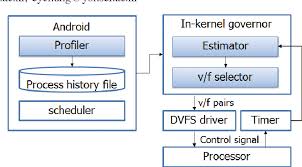
Implementing DVFS (Dynamic Voltage and Frequency Scaling) on an Android phone's operating system involves several steps and components. DVFS is a technology used to dynamically adjust the processor's voltage and clock speed to optimize power consumption, extending battery life and reducing heat generation. The implementation process involves the following steps:
1. Hardware Support Check
- Before implementing DVFS, you must confirm whether the Android device's processor supports DVFS. Most modern mobile processors do support this feature.
2. Role of the Operating System
- Android OS is based on the Linux kernel, and DVFS is primarily managed at the kernel level. The kernel monitors the CPU’s state and adjusts the clock speed and voltage according to the processor’s load.
3. Integration with the Scheduler
- The CPU scheduler determines the processor's load and adjusts DVFS accordingly. It analyzes the current tasks and processor activity to find the optimal balance between performance and power consumption.
4. CPUFreq Driver
- The Linux kernel manages DVFS through the cpufreq subsystem. This subsystem adjusts the processor's speed using various drivers and governors.
- Governors define the policies for setting the CPU's clock speed, with options like ondemand, performance, powersave, etc.
5. Voltage Regulation
- The CPU’s voltage is controlled by a voltage regulator, which works in conjunction with the CPUFreq driver to adjust the voltage according to the clock speed.
6. Testing and Optimization
- After implementing DVFS, monitor the system’s performance and power consumption to assess its effectiveness. If necessary, adjust the governor settings or develop new governors to optimize further.
7. User-Space Tools
- Developers can use tools such as cpufrequtils or cpupower to directly query or change the system’s DVFS settings. These tools allow for fine-tuning of power management strategies for specific scenarios.
Implementing DVFS plays a crucial role in balancing performance and power consumption on Android devices. It provides developers with opportunities to optimize system performance and enhance the user experience.
안드로이드 폰의 운영 체제에서 DVFS(Dynamic Voltage and Frequency Scaling)를 구현하는 방법은 여러 단계와 구성 요소가 관련되어 있습니다. DVFS는 기기의 전력 소비를 최적화하기 위해 프로세서의 전압과 클록 속도를 동적으로 조절하는 기술입니다. 이는 배터리 수명을 연장하고 열 발생을 줄이는 데 도움이 됩니다. 구현 과정은 다음과 같습니다:
1. 하드웨어 지원 확인
- DVFS를 구현하기 전에, 해당 안드로이드 기기의 프로세서가 DVFS를 지원하는지 확인해야 합니다. 대부분의 현대 모바일 프로세서는 DVFS를 지원합니다.
2. 운영 체제의 역할
- 안드로이드 OS는 리눅스 커널을 기반으로 하며, DVFS는 주로 커널 레벨에서 관리됩니다. 커널은 CPU의 상태를 모니터링하고, 프로세서의 부하에 따라 클록 속도와 전압을 조정합니다.
3. 스케줄러와의 통합
- CPU 스케줄러는 프로세서의 부하를 결정하고 이에 따라 DVFS를 조정합니다. 스케줄러는 현재 실행 중인 작업과 프로세서의 활동을 분석하여 최적의 성능과 전력 소비 균형을 찾습니다.
4. CPUFreq 드라이버
- 리눅스 커널은 cpufreq 서브시스템을 통해 DVFS를 관리합니다. 이 서브시스템은 다양한 드라이버와 거버너를 통해 프로세서의 속도를 조절합니다.
- 거버너는 CPU의 클록 속도를 결정하는 정책을 정의하며, 예를 들어 ondemand, performance, powersave 등이 있습니다.
5. 전압 조절
- CPU의 전압은 전압 레귤레이터를 통해 조절됩니다. 이는 CPUFreq 드라이버와 함께 작동하여, 클록 속도에 맞춰 전압을 올리거나 내립니다.
6. 테스트 및 최적화
- DVFS 구현 후, 시스템의 성능과 전력 소비를 모니터링하여 효과를 평가합니다. 필요한 경우, 거버너 설정을 조정하거나 새로운 거버너를 개발하여 최적화할 수 있습니다.
7. 사용자 공간 도구
- 개발자는 cpufrequtils 또는 cpupower 같은 도구를 사용하여 시스템의 DVFS 설정을 직접 조회하거나 변경할 수 있습니다. 이를 통해 특정 시나리오에서의 전력 관리 전략을 미세 조정할 수 있습니다.
DVFS 구현은 안드로이드 기기의 성능과 전력 소비 사이의 균형을 맞추는 데 중요한 역할을 합니다. 이는 개발자가 시스템 성능을 최적화하고 사용자 경험을 향상시킬 수 있는 기회를 제공합니다.
'IT' 카테고리의 다른 글
| Power-on Reset Sequence (3) | 2024.08.01 |
|---|---|
| Understanding CPU Power Management: Key Components and Interactions (2) | 2024.08.01 |
| Clock Generator in Critical Path Monitor (CPM) (0) | 2024.08.01 |
| 저전력 시스템에서 슬립 트랜지스터 설계 시 고려 사항 (2) | 2024.08.01 |
| Considerations for Designing Sleep Transistors in Low-Power Systems (0) | 2024.08.01 |